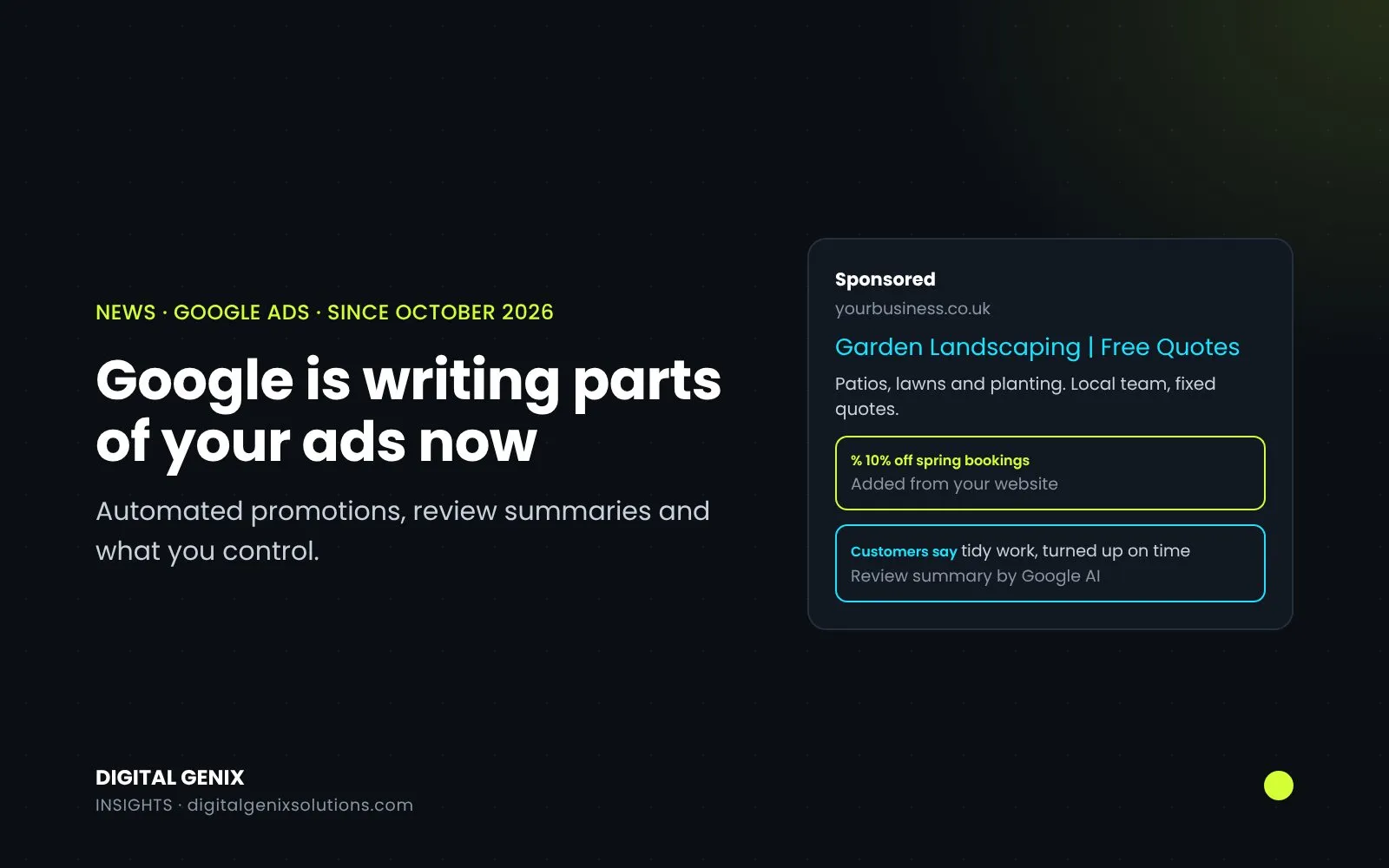
Two changes this autumn mean some of what appears in your Google Search ads is no longer written by you. From 12 October, Google started adding offers it finds on your website as promotions in some Search and Performance Max campaigns. In late October, Google documented AI-written review summaries that can appear inside Search ads in the UK, US, Australia and India. Both are Google Ads automated assets, in the sense that Google creates them rather than you. Neither needs you to do anything to start, and only one of them can be switched off.
If you run Search ads in the UK, these are worth ten minutes this week.
The short version
| Automated promotions | Review summaries | |
|---|---|---|
| What Google adds | Deals and offers found on your website, shown as a promotion | A short AI summary of online reviews about your business |
| Campaigns | Search and Performance Max campaigns that use location assets | Search campaigns |
| Markets | Not stated by Google | UK, US, Australia and India, in English |
| Started | 12 October 2026 (Google's email to advertisers) | Help page published in late October 2026; no start date given |
| Can you switch it off? | Yes, at account level | Google doesn't describe a way to |
| Can you edit it? | No, but campaigns with your own promotion assets are skipped | No |
Automated promotions (live since 12 October)
Google's account-level automated assets page describes automated promotions as an AI feature that "automatically source, validate and display high-quality deals and offers from your website and other sources". They show in Search and Performance Max campaigns that use location assets. Google's email to advertisers, quoted by Search Engine Roundtable, gave the start date as 12 October 2026 and said campaigns that already have promotion assets attached are skipped.
We covered what to check before it started in our October post on automated promotions. The short answer is still the same. If the offers on your site are current, simple and apply everywhere you advertise, leaving it on is reasonable. If they're branch-specific, time-limited or carry conditions, switch it off and add your own promotion assets.
How to switch it off. These are the steps on Google's help page for any account-level automated asset:
- Go to Assets in the Campaigns menu.
- Under the Associations tab, select the three-dot menu on the right, then Account-level automated assets.
- Select the three-dot menu again, then Advanced settings.
- Select the asset you want to turn off (here, automated promotions).
- Choose a reason, add a comment if you like, and save.
It's an account-wide switch. There's no campaign-level control for this one, so if you want promotions in some campaigns and not others, turn the automated version off and add your own promotion assets where you want them.
Not the same as Merchant Center promotions. Google Merchant Center has its own automated promotions for free listings and Shopping ads, which takes offers from product pages. Google lists it as a closed beta, with Great Britain among the countries. It's switched off from the Promotions section of Merchant Center, not from Google Ads, so online shops may need to check both.
Review summaries (documented in late October)
Google's help page on review summaries describes them as "AI-powered summaries of online reviews that appear directly as part of your Search ads." What the page says:
- Where: Search campaigns, in any ad position on Google.com, on all devices.
- Markets: the US, Australia, the UK and India, in English only.
- Who: all advertisers except sensitive categories, such as pharmaceuticals.
- Tone: summaries highlight positive points only.
- When they show: only when Google predicts the summary will improve the ad's performance.
- Editing: "advertisers cannot directly edit or customize the generated text."
Google says it gathers the reviews "from across the web", without naming the sites. The help page doesn't describe any way to opt out or to report a summary you disagree with. It links to the account-level automated assets page as related reading, but it doesn't say review summaries can be switched off from there. PPC Land checked the same page and lists both questions as unanswered.
What you can do about it. The only real lever is the reviews themselves. Read what people say about you on Google and the other sites your customers use, because that's the material the summary is built from. If a summary says something wrong about your business, take a screenshot and raise it with Google Ads support. The help page's "Contact us" link is the route it offers.
Other Google Ads automated assets at account level
Promotions are one of nine account-level automated asset types on Google's help page:
- dynamic sitelinks
- dynamic structured snippets
- automated location assets
- seller ratings
- dynamic callouts
- dynamic business information, including your business name and logo
- dynamic image assets
- automated promotions
- site visits
Each one is switched off from the same Advanced settings page, one by one. Many of them simply give your ad more space on the page. The ones worth reading closely are those that put words in your mouth, like dynamic callouts and structured snippets, because Google builds them from your website's content.
Headlines written by AI Max
Separately, if your Search campaigns were moved to AI Max in September, Google may also be writing extra headlines and descriptions for you through text customisation. That's covered in our guide on checking what AI Max switched on, including how to remove a single headline you don't like.
Spotted in tests, not confirmed
Two more things have been seen on Google this month, both reported by Search Engine Roundtable and neither confirmed by Google:
- AI summaries above and within ads (9 November): a summary across all the ads at the top of the page, plus an AI-written description inside each ad (report).
- A "Found on site" label (12 November): a line under some ads linking to another page on the advertiser's site (report).
We'll update this post if Google documents either of them.
What to do this week
- Clean up your website's offers. Old banners on forgotten landing pages are exactly what automated promotions will pick up.
- Decide on automated promotions and switch them off at account level if they don't suit you.
- Add your own promotion assets to the campaigns where you do want an offer showing. You choose the wording and the dates.
- Read your reviews on Google and other sites, since they feed review summaries.
- Look through the other automated assets in Advanced settings and turn off any that quote your site in a way you wouldn't.
If you'd like us to go through it with you, our free PPC audit covers which automated assets are running in your account, what they're saying and whether to keep them. We also handle this as part of Google Ads management.
Sources
- Google Ads Help: About account-level automated assets, About review summaries
- Google Merchant Center Help: Manage automated promotions
- Search Engine Roundtable: Google Ads automated promotions from 12 October (5 October 2026), AI-generated review summaries help doc (26 October 2026)
- PPC Land: Review summaries in Search ads in four markets (25 October 2026)